With the wobie fav app, you don’t just set up your wobie box, you also assign Spotify to the rainbow buttons. For on the go, you can save your own MP3s on a microSD card and take them with you.
How does music get onto the wobie box?

wobie fav

Set up, play, swap.
How your wobie box works – it’s that simple
The wobie box makes streaming child-friendly. Three short steps to audio bliss:
- Get the app: Install the free wobie fav app (iOS/Android) and connect the box to your Wi-Fi.
- Assign buttons: Select an album, audiobook, or playlist in the Spotify app, play the content via Spotify Connect on the box, and assign it to one of the colourful rainbow buttons in the wobie fav app.
- Click & Go: Your children simply press a button – the box plays Spotify immediately without a smartphone.
Stay flexible: Whether it's a bedtime story or 90s hits – the buttons can be reassigned via the app at any time.


A regular Spotify account is required to use Spotify Connect on the wobie box.
You wonder how exactly it works? Well, then watch this video:

On the go & record your own stories

Take your own MP3s with you
Take your own audio files on a microSD card with you and play them from anywhere.
You can organise your audio files on the rainbow buttons via your computer.
Did you know? With a microSD card inside your wobie box, you can record your own stories and save them on the wobie box.
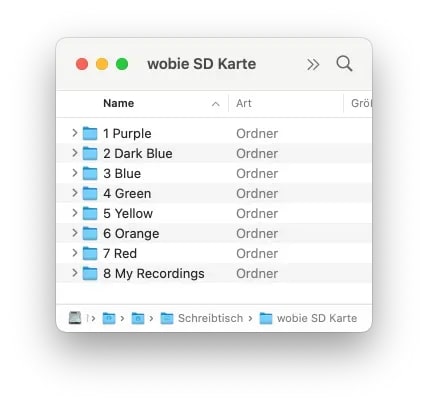
This is how it works:
You need a microSD card with a maximum storage capacity of 128 GB. We recommend formatting the card in the FAT file system, not in NTFS format.
- Create eight folders on the microSD card with the exact names shown in the image.
- You can then copy an album onto the card by transferring the tracks directly from your computer in the desired playback order. Pay attention to the timestamp of the files: the file copied first will be played first.
Supported file formats are: .mp3, .wma, .wav